See What’s Possible with DataAgents.
Are you looking for a solution to automate your CRM and lead data processes?
Here you'll find a complete overview of all features by DataAgents. Perfect for matching your requirements.
Workflows.
Event-based workflows respond to triggers and perform CRM updates exactly when the signal is received. The start signal is flexible and versatile: for example, you can connect your email client and use incoming signatures as a data source. Additionally, uploaded Excel lists, completed web forms, or linked APIs can be defined as events to trigger automations.
These automations include deduplication checks and enrichment of missing information—such as from business socials, our company data search, AI, or connected third-party systems. This keeps your active CRM contacts automatically up to date—according to your rules.
Examples of diverse possible workflows are showcased in our DataAgents
Our in-house experts are here to assist you in setting up the workflows.
Continuous workflows automatically and continuously update and enrich all existing contact data using external data sources. Once all contacts have been reviewed, the workflow starts again. Depending on predefined rules, the workflow automatically decides whether to create a new record, update an existing one, or provide a suggestion for manual review.
Our in-house experts are here to assist you in setting up these workflows.
You can process contact information fully automatically or configure it based on the “human in the loop” principle: using contact suggestions in DataAgents, you define yourself in which cases manual approval is required before data is created or updated in the CRM.
Thanks to the multitude of workflow nodes available in the workflow editor within DataAgents, there are endless possibilities for creating a workflow. By flexibly combining nodes, almost any use case can be addressed. Additionally, the nodes are constantly being expanded.
A brief selection of possibilities includes:
Duplicate Check: Search the CRM for an existing record with the same information.
Company Data Search: Find publicly available company information.
AI Query: Process data using your custom AI provider.
Profile Creation: Create a new profile in your marketing automation setup.
Phone Number Formatting: Convert phone numbers into a globally defined format.
On your DataAgents homepage, you receive an overview of the number of data entities automatically processed for you. Here, you can review which entities or fields in your CRM system have been processed manually or automatically and how frequently. Additionally, you can see a comparison of entities that have been verified, updated, or newly created.
The workflow execution overview also enables you to identify whether a workflow might have failed.
Integrations.
snapAddy DataAgents can connect to popular CRM systems like Salesforce, SAP, Dynamics, and HubSpot. For custom configurations or fields, we support you in CRM mapping. This ensures DataAgents works seamlessly with your CRM.
Explore the integration options
You can seamlessly integrate your own AI provider and specifically use it for data processing. For instance, it allows for automatic creation of company profiles based on a company name, including relevant business information. The AI assists in intelligently enriching, structuring, and converting raw data into valuable information—directly within the workflow.
snapAddy DataAgents can be connected not only to CRM systems but also to marketing automation tools.
Explore the integration options.
Using a webhook or REST API, you can transmit additional data from DataAgents to other systems.
CRM Service.
CRM mapping refers to the field synchronization between DataAgents and your CRM system. This can be implemented with familiar standard fields (e.g., name, company, phone number), which vary depending on the CRM system.
snapAddy's CRM mapping also allows for customization and expansion of fields. This means custom fields in your CRM system can also be filled using DataAgents.
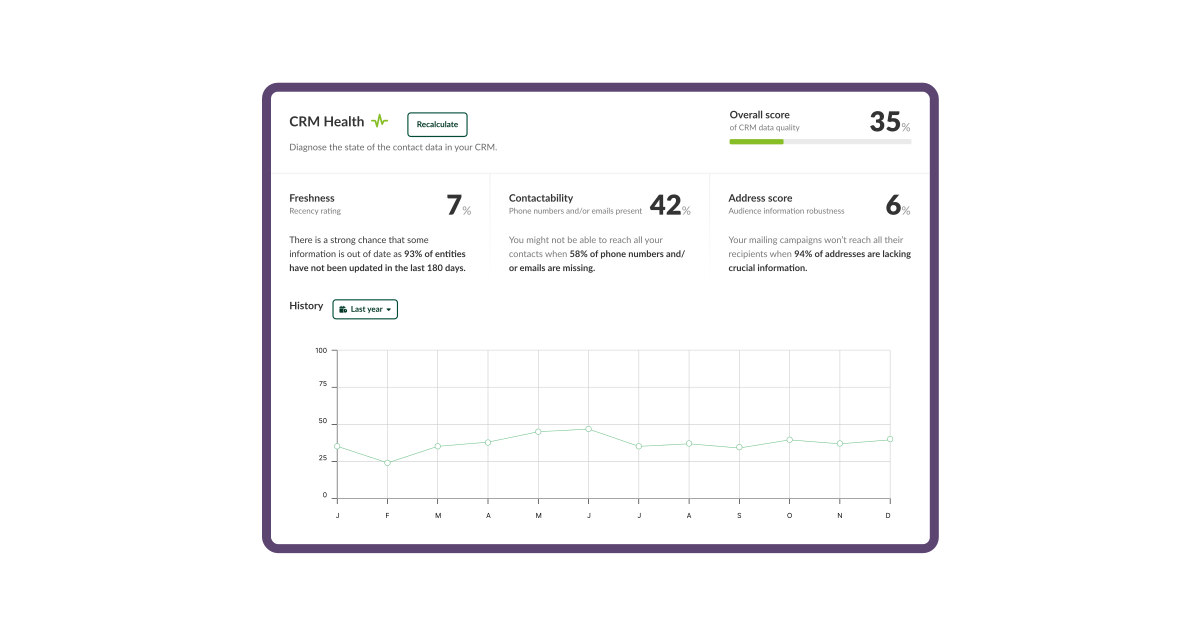
The CRM Health Score in DataAgents determines the state of your CRM contact data. At a glance, you can see how current, accessible, and high-quality your company and contact information is within your CRM system. The health status is represented as a percentage.
This overall assessment is derived from three categories: "Currentness," "Accessibility," and "Address Evaluation." These highlight the problematic areas in your CRM system.
Organization.
You have four distinct rights and roles configurations to choose from for clearly managing access rights and responsibilities within the system. As an admin, you can centrally manage cross-product rights and settings. DataAgents Managers, however, hold organizational-level rights at the product level. Furthermore, a distinction is made between Mailbox Users and Main Users: the former only connect their email inbox as a data source within DataAgents, while the latter actively engage with the product.
Our DataAgents software solution is available in five languages:
- German
- English
- French
- Spanish
- Italian
Security & Data Privacy.
Your employees can authenticate themselves on snapAddy DataAgents using single sign-on. This allows your administrators to centrally manage all access, with your employees needing only one password to log in to all services. This not only reduces administrative effort but also enhances data security within the company.
Data storage and the business logic of our software solutions are implemented at Amazon Web Services (AWS) in Frankfurt am Main, Germany. Hence, the processing of personal data is exclusively performed within the EU or Germany, and such data never leaves European borders. We have finalized all GDPR-required contracts with AWS as a subcontractor; additionally, our hosting provider is ISO-certified.

API tokens and other sensitive data are stored centrally and encrypted. Within the workflow, only a reference to the respective secret is used, so the actual value is never visible at any point. You manage all secrets centrally via the settings.