Privacy & Security Hub.
The security of your data and our technology is snapAddy's highest priority.
We apply state-of-the-art approaches to identify and eliminate potential attack vectors before they can become a threat.
IT Security.
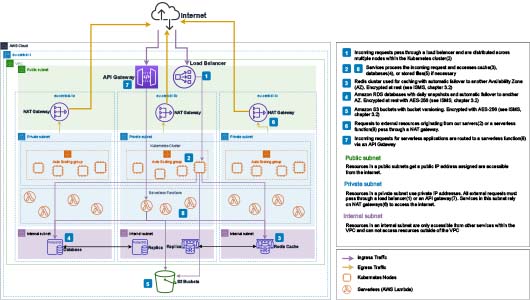
The diagram above (as of 10/2025) provides an overview of snapAddy’s technical infrastructure. Our business logic is operated exclusively in data centers in Frankfurt am Main (AWS region: eu-central-1). The individual services are protected within a private VPC and distributed across three independent availability zones for maximum fault tolerance.
Data flow between snapAddy clients – general
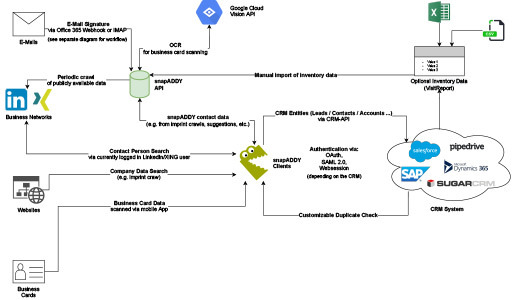
The data flow diagram shows the different data sources used by snapAddy to generate contact data and contact suggestions, to enrich existing data, and the connection to your CRM system that is used for the respective export.
DataAgents (formerly DataQuality)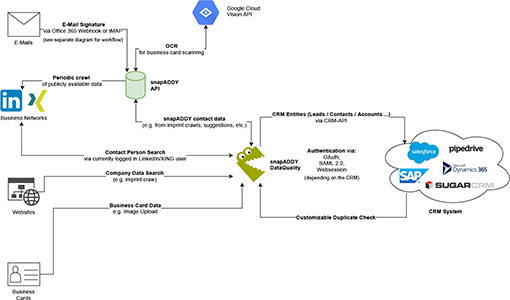
Open diagram
BusinessCards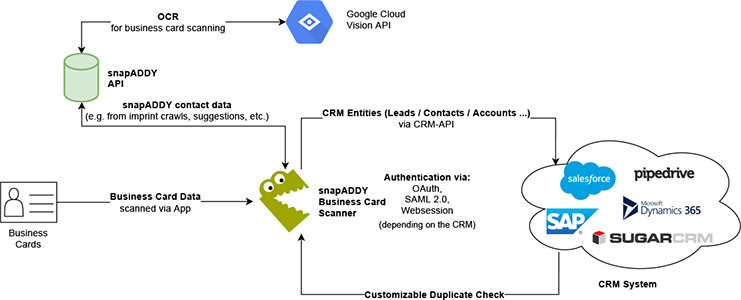
Open diagram
VisitReport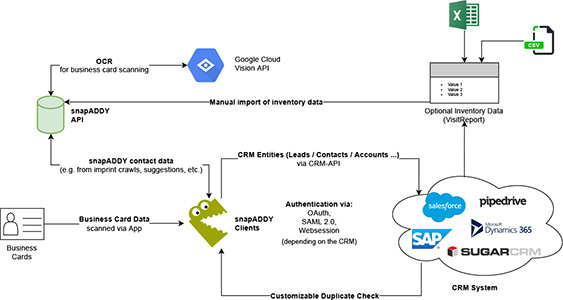
Open diagram
The diagrams also show manual uploads of inventory data via Excel or CSV files that have been exported from your CRM system or another data source.
CRM connections
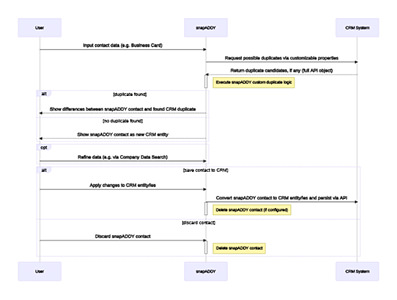
The sequence diagram describes the technical workflow of our duplicate check in DataAgents as well as in our BusinessCards and VisitReport apps. First, the data entered by the user is checked for duplicates in your CRM system. Depending on the CRM system, different connection options are available, such as OAuth. If a duplicate is found in your CRM system, you can see the differences identified by snapAddy in a clear merge view. In this view, you can select which data you want to keep and which you want to discard. At your request, the data is then created or updated in your CRM system.
All databases used by snapAddy in production are automatically backed up daily via RDS snapshots. Transaction log snapshots are also created at regular intervals, enabling point-in-time recovery to within minutes of any potential incident. RDS snapshots and transaction logs are stored in Amazon S3 and retained for 30 days.
Object versioning is enabled on all S3 buckets used by snapAddy. Older versions and deleted objects can be restored within a 30-day window.
Deleted data is first marked for deletion and permanently removed after 30 days. During this period, our support team can restore accidentally deleted data upon request.
All requests to and between our servers are protected by transport encryption. HSTS and automatic HTTP-to-HTTPS redirects ensure that all external traffic is encrypted. Our servers support TLS 1.2 and 1.3 with strong cipher suites; internal server-to-server communication uses mTLS 1.3. These measures earn us an A+ rating on the SSL Labs SSL Server Test.
All databases and S3 buckets containing customer data are encrypted using AES-256. Database encryption keys are protected by master keys managed by AWS Key Management Service (KMS). KMS master keys are stored on Hardware Security Modules (HSMs) validated to FIPS 140-2 Level 2 (Level 3 in select categories). Further details are available in our ISMS (Section 3.2).
snapAddy offers several authentication options. You can use a standard username and password login, optionally secured with two-factor authentication. Alternatively, we offer Single Sign-On via OAuth (OpenID Connect) for Microsoft, Google, and Apple identity providers, or SAML integration with the identity provider of your choice. For more information on setting up SAML, please refer to: How to set up SAML 2.0 Single Sign-On
Organization administrators can assign roles to users, which define their access rights. Roles restrict access to specific resources and can be configured with granular precision.
You can find an overview of the available roles here:
To use the Email Contact Suggestions feature, it is necessary to establish a connection between snapAddy and your email account. There are two ways to establish the connection. Either you establish the connection via a snapAddy OAuth application to a Microsoft account or you use a standard connection via IMAP. Since these two connection options are technically different from each other, we explain the respective security aspects separately below.
Connection via snapAddy-OAuth application
To connect your Microsoft email account, you need to grant the snapAddy Suggestions OAuth application access to the Mail.Read, User.Read, and offline_access permissions. If necessary, this access must be confirmed by your organization's Azure administrator. Next, snapAddy creates a subscription on your behalf using the Microsoft Graph API that notifies snapAddy through a webhook as soon as a new email is received for processing. Once snapAddy receives such a notification, we retrieve the email from your mailbox and extract possible signatures. During this process, at no time are the contents of the email stored or logged by us. All data is only available temporarily and only at the moment of processing (parsing).
Connection via IMAP The connection via IMAP is made using the regular access data to your IMAP account. In addition to our general encryption of the database, the password is initialized with a randomized vector using a 256bit AES-CBC secret. The encryption key is derived from an internal secret and a randomized salt using PBKD2. The stored password is not retrievable by a user and is only required for the server-side connection to your mailbox. If you can use app passwords that allow a separate password for third-party integrations of your IMAP account, we recommend using this option. For more information, please refer to: https://support.google.com/mail/answer/185833?hl=de.
In both cases, the content of your emails is never stored or logged. The emails are only in the main memory for the moment they are processed and are then discarded. Additionally, emails with certain sender domains can be completely excluded from processing by this feature.
Furthermore, contact suggestions based on incoming emails are only stored in the snapAddy contact list selected by the user. Each user can individually define who has access to this list.
Why should I connect my (outgoing) email server?
Some features of snapAddy VisitReport require you to define an outgoing email server for sending emails. This includes the automatic sending of so-called "notification emails" when exporting reports from the VisitReport app as well as sending follow-up emails to the captured leads.
How can I establish the connection?
We recommend setting up a separate SMTP user (hereafter: "technical user") for sending emails via snapAddy. This technical user should be provided with a secure password that is not used elsewhere and can thus be regarded as an API token.
Depending on the functionality of your email server, the permissions of this technical user can also be significantly restricted (e.g., in the case of notification emails, limited to sending emails within your own domain, etc.).
Is the connection via SMTP secure? The connection from snapAddy to your email server via SMTP is secured by modern encryption methods: snapAddy supports all industry standards for encrypted SMTP connections (SSL/TLS and STARTTLS) and the SMTP credentials you provide are in addition stored encrypted.
If you set up the provided SMTP user as a "technical user" as recommended above, you do not have to pass on any password used elsewhere to snapAddy and also have full control over which recipients emails may be sent to. You also have full transparency over errors that may occur when sending emails (such as bounces) using your own email server.
Do you also offer techniques such as SPF or DKIM?
Currently, these techniques are not offered since snapAddy does not operate its own email server infrastructure. For the usage scenario of snapAddy VisitReport, SPF and DKIM also do not provide any additional security, but on the contrary would only allow the overall release of snapAddy IP addresses as legitimate senders for all email addresses in your domain.
Thus, these techniques would force you to grant significantly more rights than needed (particularly sending emails on behalf of every possible sender address in your domain). With the above approach via SMTP users, a much more restrictive (and thus potentially more secure) configuration is possible.
If you nevertheless do not want to pass SMTP credentials to snapAddy, but instead use SPF or DKIM, we recommend configuring an SMTP relay server via an external provider.
We use the Amazon GuardDuty intrusion detection system (IDS) to monitor network activity in our infrastructure. GuardDuty analyzes audit, DNS, and network logs and notifies us in case of suspicious activity. You can find more information about GuardDuty here: https://aws.amazon.com/guardduty/
In addition, we regularly have our system tested externally by performing penetration tests. We work together with the renowned service provider CRISEC for this purpose.
At the infrastructure level, only a few employees of many years standing at snapAddy have full access to production areas. This access is regulated via the AWS rights and roles concept and can be transparently tracked through audit logs.
At the application level, an additional group of employees for support processes has restricted access to customer organizations. These accounts are additionally secured by two-factor authentication. All activities can be tracked via audit logs.
Data Privacy.
Information about the data we collect and store about you and your associated rights can be found here:
https://downloads.snapaddy.com/documents/snapaddy-general-data-protection-information-en.pdf
Using snapAddy solutions, your employees capture or enrich contact data from sources available to them—such as business cards and email signatures—or from public sources such as websites, Google Maps, and professional networks. This data is used to create new contacts or update existing ones in your CRM system.
snapAddy processes personal contact data that would be available to your employees even without snapAddy software, albeit in unstructured form. This includes data from sources accessible only to your organization (e.g., business cards, email inboxes) as well as publicly available sources (e.g., imprint pages, professional networks).
snapAddy makes it easier for your team to capture contact data from these sources and partially automates the process. Beyond the external sources listed above, snapAddy does not maintain any internal contact database for enrichment purposes.
Data sources:
• Email signatures
• Websites & imprint pages
• Google Maps
• Business cards
• Professional networks
All data storage and business logic for our software solutions are hosted on Amazon Web Services (AWS) in Frankfurt am Main, Germany. Personal data is therefore processed exclusively within the EU and Germany and never leaves European borders. We have entered into all GDPR-required agreements with AWS as a sub-processor; our hosting provider is also ISO-certified.
No, your customer data and the contacts you record will not be shared with other companies or used to create a contact database. All contact data you record is accessible only to your company.
In general, contacts captured by our customers are not stored long-term in snapAddy solutions but are exported to a CRM system (or Excel, etc.) after being processed. Once the data has been deleted from the snapAddy software, it is permanently deleted from our systems after the backup deadlines expire.
As an administrator, you can set in the snapAddy software that all recorded data is automatically deleted from snapAddy after being exported.
Besides the Order Processing Agreement, there are technical and organisational measures (TOMs) to ensure data security. These measures meet the standards required by the GDPR.
You can download an overview of our TOMs here:
https://downloads.snapaddy.com/documents/snapaddy-toms-en.pdf
For the operation of our products, we use Amazon Web Services (AWS) as our cloud hosting provider and Google Cloud Vision for optical character recognition (OCR) on business cards.
A complete list of sub-processors is included in our Data Processing Agreement
The use of snapAddy software does not change your current procedures and requirements for creating new contacts or leads in your CRM or other systems. Only the previously manual creation of a new contact will be partially automated.
Of course, your staff and CRM users must comply with applicable law when using the software and, if necessary, obtain the consent of the individuals being processed.
For example, if there is a current business opportunity and your staff creates a lead in the CRM system for legitimate interest, then snapAddy only automatizes this manual step. If your staff store any contact data in the CRM without the consent of the concerned person, this action would not be GDPR compliant, regardless of whether snapAddy software is used or not.
By generating updated suggestions for contacts based on sources available to you or public sources (business cards, email signatures, business networks), the principles of the GDPR (e.g., the principle of accuracy of stored data) are also positively applied.
Since snapAddy solutions process personal data, you must conclude an Order Processing Agreement with snapAddy according to Art. 28 of the GDPR.
All important rights and obligations for you as a client and us as a contractor are specified in this agreement. Please use our sample agreement for this purpose, sign it and send it back to legal@snapaddy.com.
Individual Order Processing Agreement
It is also possible to fill in and sign a customized order processing form that you have created. However, we will have to charge you for the cost of legal review of your documents.
When data is transferred to a third country, comprehensive data protection measures must be taken, such as the conclusion of standard contractual clauses and the performance of a data transfer impact assessment to check whether data processing in the third country is permissible. In the case of data processing in the USA, there is the "Data Privacy Framework" adequacy decision, which applies if a service provider is certified under this. At snapAddy, we use the hosting provider Amazon Web Services (AWS) to store data. All data is processed in a data center in Frankfurt am Main and therefore does not leave the European Union.
snapAddy's solutions do not create a copy of the data in your CRM system but are based on bidirectional interfaces that retrieve the information required for the respective action directly from your CRM system. For example, this includes the automatic duplicate check that searches in real-time for possible duplicates of a contact in your CRM system.
We have appointed SiDIT GmbH as our external Data Protection Officer.
SiDIT GmbH
Tel.: +49 931 78 08 770
Email: legal@snapaddy.com
Yes, for a part of our offerings. The EU AI Regulation (AI Act) applies to a subset of snapAddy's products. Under the AI Regulation, we act exclusively as a deployer of securely integrated third-party AI services – we do not place our own AI systems on the market as a provider. Our features do not fall into prohibited or high-risk categories. We label AI features transparently, do not use customer data for model training, and comply with all requirements applicable to deployers. Details can be found in our information paper which you can download here.
Certified.
Our IT information management system is ISO 27001-certified and audited under STAR Level One criteria, meeting the highest international standards.

Data Sources.
snapAddy solutions enable efficient capture of business data from a wide range of sources. Below is an overview of these sources and the specific data that can be captured from each.
Email Signatures.
Email signatures from incoming emails are a valuable source of contact information, as the data they contain is generally up to date and therefore accurate. With snapAddy LeadResearch, you can manually capture signatures using copy and paste. With snapAddy DataAgents, you can automatically read out contact information via the "Email contact suggestions" function. To do this, you connect the email inboxes to be used as sources to our solution via IMAP or Office 365 (Graph API).
Websites & Legal Notice.
The snapAddy solutions LeadResearch and DataAgents can automatically search ("crawl") for contact pages or legal information pages in order to read out company master data. You can start the search for such data in the snapAddy dashboard or manually highlight contact information on websites and capture it via a keyboard shortcut ("grab").
Google Maps & Google Places.
We use the Google Places API and display company information from Google Maps or Google Places to enrich the company master data in your CRM system.
Business cards.
snapAddy solutions can capture images of business cards and automatically extract the correct contact data from them using our text and intelligent contact recognition technology.
Business networks.
For the "Social Network Updates" service, snapAddy uses publicly accessible profiles from professional networks to identify changes in position or employer. In addition, contacts can be transferred directly into snapAddy LeadResearch on the basis of profiles in professional networks. In this process, only the job title, name, and company name are transferred.
Downloads.
All relevant data privacy documentation is available for download as PDF: